Route: Package Tracker
- 4.7
- Rating
- 5.00M
- Installs
- Free
- Price

 Analysis by App-foxy
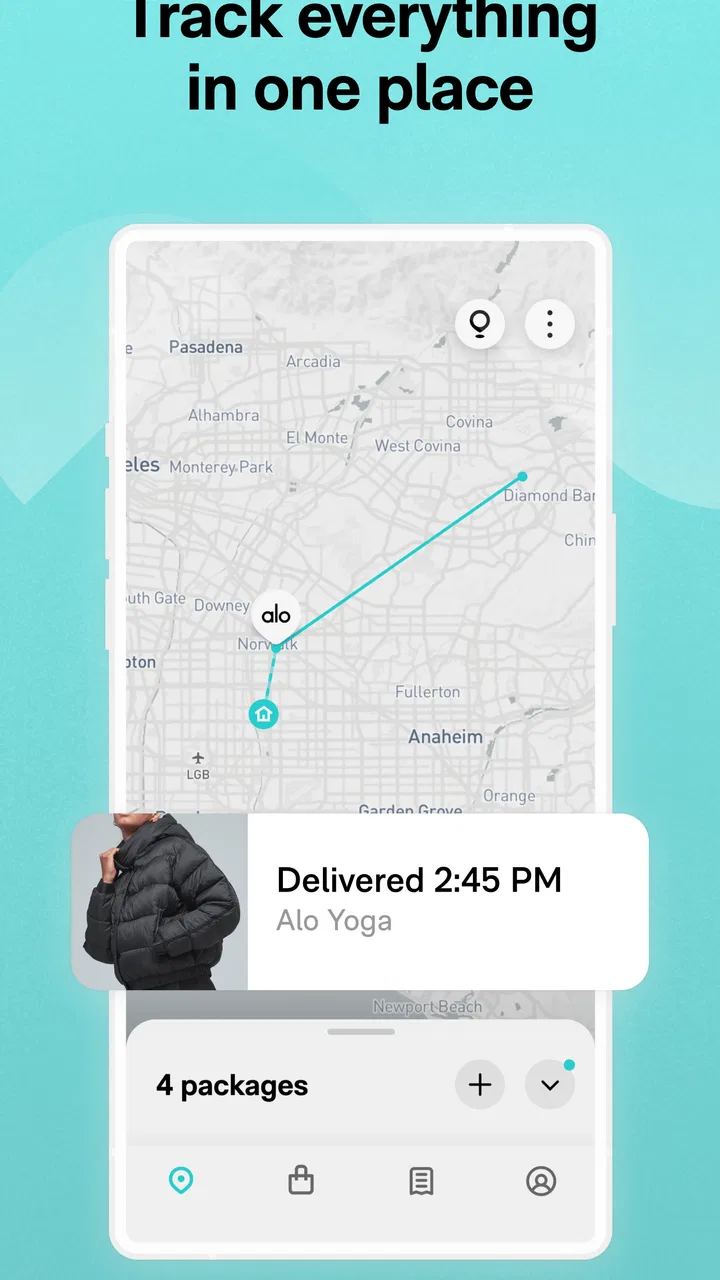
I use Route: Package Tracker as a central place for following online orders, and its biggest appeal is simple: it can bring shipment updates from different retailers and carriers into one shopping-focused app instead of making me search through separate order emails. That sounds modest, but it becomes genuinely useful when several purchases are moving at once, especially when one delivery is handled by Amazon, another by FedEx, and a third by USPS.
Route App Inc developed this free shopping app for Android, where it has reached more than one million installs. Its average rating is 4.7 from roughly 187 thousand ratings and about 14 thousand written reviews, which suggests that the basic tracking idea works well for a large audience. I would still treat those numbers as background rather than a guarantee: package tracking is only as helpful as the order information it receives and the carrier updates behind it.
My overall impression is that Route is best understood as an organizer and notification layer, not as a replacement for a retailer’s customer-service system. It helps me see what is happening with an order, but it does not change the carrier’s route, resolve a damaged parcel, or replace the store when I need a refund. That distinction matters if you are deciding whether it deserves access to your shopping activity.
You May Also Like

 Blood Strike: 2.5 Anniversary
Blood Strike’s Loadouts Turn Every Drop Into a Tactical Gamble
A close look at Blood Strike’s custom loadouts: how fast access to signature weapons reshapes its battle royale rhythm, rewards preparation, and narrows the gap between fights.

 Pandora - Music & Podcasts
Pandora’s Music Is Easy to Start, but Harder to Recover
Pandora’s strength is its low-effort path from a seed to a station. Its weak spot is how much confidence it asks you to place in connection, setup, and quiet recovery.

 8 Ball Pool
 Is Built on Rivalries, Rematches, and Routine
A close look at the rivalries, rematches, shared routines, and unanswered safety questions that turn a quick pool match into a persistent mobile community.

 Samsung Music
’s Quiet Strength Is Playing What You Already Own
Its reach comes less from spectacle than from dependable access to a personal library. That simplicity is both the app’s strongest retention engine and its ceiling.

 AccuWeather: Weather Radar
AccuWeather Review: A Quick, Clear Forecast for Everyday Decisions
For everyday plans, the best forecast is the one you can understand quickly. AccuWeather makes rain timing, radar, and local conditions easy to act on, with a few trade-offs.

 Hill Climb Racing
Why Hill Climb Racing Still Turns Crashes Into One More Run
A tiny car, a bumpy hill and one more upgrade: Hill Climb Racing keeps resurfacing because its simple chaos makes every near-miss feel personal.
More From Our News Desk



What Route is like in everyday use
The first useful change is mental rather than technical. Instead of opening an inbox, locating an order confirmation, finding a tracking number, and then moving to a carrier website, I can use one place to check the progress of purchases. For someone who buys from several online stores, that reduction in small tasks is the reason to try it.
A realistic example is a week in which I order household supplies, a replacement phone case, and a gift. The purchases may arrive through different services and on different days. Route gives me a single view of the delivery activity, so I can quickly see which parcel is still preparing, which one is in transit, and which one is close enough that I should be available for it. I do not have to remember which carrier belongs to each order.
The app’s store summary specifically points to Amazon, FedEx, and USPS, so those are the kinds of delivery activity I would expect it to handle. I would not assume that every retailer, marketplace, courier, or international shipping method behaves identically. Before relying on it for an important delivery, I would check whether the order appears correctly and keep the retailer’s confirmation email until the parcel is safely received.
That last habit is important because a tracker is not the same thing as proof of delivery. If a status looks delayed or confusing, the original order details may contain information Route cannot replace, such as the seller’s return conditions, the exact item purchased, or instructions for contacting support. I see Route as a convenient dashboard, while the retailer and carrier remain the authoritative places for disputes.
Why a unified timeline can be better than carrier apps
Using separate carrier apps can be sensible when I regularly ship with one service and need its specialized tools. A carrier’s own application may be the better choice for delivery preferences, address-related actions, or detailed service information. Route has a different advantage: it is oriented around the order rather than forcing me to think first about the courier.
That makes it particularly practical for people who shop across many stores. I can begin with “What am I waiting for?” rather than “Which carrier has this package?” This is a small but meaningful difference. It saves the most time when I have several unrelated purchases and do not want to maintain a personal list of tracking numbers.
The trade-off is that a unified view can make the experience feel less precise than visiting the original source. A retailer may show the order total, product details, and support options, while a tracking app concentrates on movement and delivery progress. I would choose Route for overview and convenience, then switch to the store or carrier when the situation becomes unusual.
Where the experience can become less smooth
Automatic order organization is convenient, but it also means the app’s usefulness depends on how clearly an order can be recognized and matched. Orders with multiple shipments, changed delivery addresses, preorders, replacements, or unusual fulfillment arrangements can be harder to interpret than a simple one-box purchase. I would pay closer attention when one order is split into several parcels, because a single shopping event may not equal a single delivery.
Notifications can also become noisy if I buy frequently. The right balance is to use Route for meaningful delivery awareness without treating every status change as urgent. If I receive too many alerts, I would review the available notification choices rather than allowing a useful tracker to become another source of interruption. The value is in reducing attention spent on deliveries, not in making me watch every scan.
Another practical limitation is that tracking information can lag behind reality. A carrier scan may arrive late, a parcel may move without a new public update, or a delivery estimate may change. I would never arrange an important appointment solely from an estimated arrival shown in a tracking app. For time-sensitive packages, I would verify the latest information with the carrier and keep a backup plan.
Trust begins with the information the app can see
Because Route deals with online orders, trust is not only about whether a package appears on screen. It is also about what information I am comfortable bringing into the app. Order activity can reveal shopping habits, delivery locations, purchase timing, and the stores I use. Even when the purpose is practical, that is personal context.
My approach is to treat the initial setup as a decision point rather than tapping through it automatically. I would read each visible permission or account prompt, consider whether it is necessary for the tracking experience I want, and avoid granting access simply because it makes setup faster. If the app offers more than one way to add or manage orders, I would choose the option that gives me the clearest control over what is shared.
I also would not confuse a polished interface with a complete privacy explanation. The relevant questions are straightforward: what account information is requested, what order details are imported, which notifications are enabled, and how the account can be managed later. Those are the areas I would inspect in the app’s visible settings and privacy materials before adding a large history of purchases.
Route is marked for Teen users, so I would still encourage younger users to involve a parent or guardian when account access, shopping history, or delivery addresses are involved. The age label is not a substitute for understanding the choices on screen. A teenager may use the tracker for a personal order, but household deliveries can expose information about other people too.
Account controls deserve attention after setup
A common mistake with tracking apps is to focus on adding the first parcel and forget about account maintenance. I would spend a few minutes checking the profile and notification areas after setup. The useful questions are whether I can adjust alerts, review connected shopping information, remove an order from view, and understand what happens if I stop using the service.
I would also review those controls after changing phones, sharing a device, or handing a phone to someone else. A delivery dashboard can reveal more than a single tracking number, so basic device security matters. A screen lock and careful account sign-out are sensible habits, particularly on a family tablet or any device used by several people.
If I decide Route is no longer useful, I would look for the app’s account and data-management choices before uninstalling it. Removing an app from a phone is not always the same as closing an account or removing information associated with it. I would want to understand that distinction from the visible controls and the developer’s current policy rather than assume that deletion works one particular way.
Those checks do not make the experience difficult; they make it deliberate. Route is more trustworthy to me when I can see what it is doing, change the choices that affect me, and leave without confusion. The important standard is not that a shopping app knows nothing about me, because tracking orders requires some order context. The standard is that I can make an informed choice about that context.
Sensitive moments when caution matters most
The most sensitive moment is usually not the ordinary delivery update. It is a prompt to connect an account, import orders, or enable a permission that broadens what the app can access. I would slow down there. I would check the wording, identify whether the choice is optional, and consider adding only the orders I actually want to follow if the app provides a narrower route.
Another sensitive moment occurs when a package is marked delivered but I cannot find it. Route can help me confirm the status and organize the relevant information, but I would not use the tracker as the only place to investigate. I would check the carrier’s details, contact the retailer when appropriate, and avoid posting tracking information publicly. A tracking number can be useful to someone who should not have it.
Returns and replacements deserve the same care. A replacement may receive a new tracking number, while the original order remains visible in a different state. I would label the situation mentally as two separate delivery threads and verify which parcel is being discussed before contacting support. This prevents a common error: assuming that a status change on the original shipment also describes the replacement.
Shared households create another subtle issue. If several people use the same shopping account or device, an automatically organized order view may expose gifts or personal purchases. I would consider whether a shared login is appropriate and would avoid leaving the app open on a communal screen. Convenience should not accidentally spoil a surprise or reveal someone else’s shopping activity.
How I would set it up for less confusion
I would begin with a small number of current orders rather than trying to reconstruct every purchase immediately. That makes it easier to see whether the app recognizes the information correctly and whether the notification rhythm suits me. Once the basic workflow feels reliable, I could decide whether the convenience justifies adding more order activity.
For each important delivery, I would keep three details together: the retailer’s order confirmation, the carrier’s tracking reference, and the expected recipient or address. Route can provide the day-to-day view, but those original details are valuable when an order is delayed, split, returned, or disputed. This simple backup system is more useful than assuming one app will answer every question.
I would also avoid treating every estimate as a promise. Delivery windows are helpful for planning, but they are not a reason to leave an expensive item unattended or miss an essential appointment. When the package matters, I would use the tracker as an early warning and confirm the final details through the carrier or seller.
For privacy, I would periodically remove old delivery information if the app’s controls allow it and if I no longer need the history. I would review notification access after major app updates, too. Route’s current version is 2.174.0, and keeping an app current can change screens or settings, so I would not assume that a choice made during the first setup remains presented in exactly the same place forever.
Who will benefit most from Route
I think Route is a strong fit for frequent online shoppers who buy from different stores and want one delivery overview. It is also useful for anyone who routinely forgets which courier is handling an order. The app’s value increases when the number of active purchases is high enough that email search starts to feel like a chore.
People who receive deliveries at work, manage household purchases, or monitor several gifts may appreciate the quick status view. In those situations, the benefit is not advanced logistics; it is reducing the number of places I need to check. The free price also makes experimentation easy, provided I am comfortable with the account and data choices shown during setup.
I would be more cautious about recommending it to someone who places only a few orders each year, prefers not to centralize shopping information, or already relies happily on a single carrier’s official app. If your main need is changing delivery instructions, resolving a missing parcel, or managing a return, the retailer or carrier will usually be the more appropriate destination.
I would also skip it if I expect perfect real-time accuracy or a complete record of every unusual shipment. No tracking dashboard can guarantee that every carrier scan appears immediately or that every complicated fulfillment arrangement will look simple. Route is most convincing when used as a convenient overview, not as the sole authority for high-stakes delivery decisions.
My cautious verdict
After using Route as a package organizer, I see a clear reason to keep it around: it turns scattered delivery information into a more manageable shopping view. Its focus on orders from services such as Amazon, FedEx, and USPS makes sense for people whose purchases do not stay with one retailer or one courier. The experience is especially helpful during busy shopping periods, when a quick glance is better than searching through multiple inboxes.
At the same time, I would install it with a deliberate privacy mindset. I would inspect account connections, permissions, notification choices, and data controls instead of assuming that convenience answers every trust question. I would keep retailer confirmations, use official carrier channels for serious problems, and be careful with shared devices and delivery details.
The app is free, supports Android 8.0 and later, and carries a Teen content rating. Those practical details make it accessible to many users, while the strong average rating and large install base indicate broad interest in its approach. They do not remove the need to decide whether centralizing order information fits my habits.
My recommendation is cautious but positive: Route is worth trying if you regularly juggle deliveries from several sources and want a simpler overview. I would keep it if its visible controls match my expectations and its updates remain useful without becoming noisy. If privacy minimization, carrier-specific tools, or direct retailer support matter more than convenience, I would rely on official services instead. Route works best when I use it as a helpful window into delivery progress, while keeping control of the original order information and the decisions that matter when something goes wrong.
FAQs for Route: Package Tracker
01What platforms is Route: Package Tracker available on?
Route: Package Tracker is available for both Android and iOS devices. You can download it from the Google Play Store or the Apple App Store. The app is optimized for smartphones and tablets, ensuring a seamless experience across all your devices.
02How does Route: Package Tracker work?
Route: Package Tracker allows you to track your packages in real time. By entering your tracking number, the app aggregates data from various shipping carriers to provide updates on your package's location and estimated delivery time. It supports a wide range of carriers globally.
03Is Route: Package Tracker free to use?
Route: Package Tracker offers a free version with essential tracking features. However, there are in-app purchases available that provide premium features such as notifications and advanced tracking options. These upgrades can enhance your experience by offering more detailed insights and customization options.
04Can Route: Package Tracker track multiple packages at once?
Yes, Route: Package Tracker can handle multiple packages simultaneously. You can enter several tracking numbers into the app, allowing you to monitor all your incoming and outgoing shipments in one place. This feature is particularly useful for frequent online shoppers or businesses.
05Is my data secure with Route: Package Tracker?
Route: Package Tracker prioritizes user privacy and data security. The app uses encryption to protect your information, ensuring that your tracking data is confidential and only accessible to you. Regular updates and security checks are conducted to maintain the highest security standards.
Pros
- Intuitive user interface for easy navigation.
- Real-time tracking updates for packages.
- Supports multiple carriers worldwide.
- Custom notification settings available.
- Offline access to tracking history.
Cons
- Ads can be intrusive during use.
- Limited free features without subscription.
- Occasional delays in update sync.
- No integration with email tracking.
- Requires account for full functionality.

Route: Package Tracker
Gallery